

Stop 10%–50% Airbnb Cancellation Fees for Vancouver Hosts: Evidence
Canceling an Airbnb reservation as a host almost always costs you money. Airbnb charges a fee of 10%, 25%, or 50% of the reservation depending on how close to check-in you cancel, with a $50 minimum, and it also blocks your calendar and flags your listing. The only real escape is documentation: a Major Disruptive Event or a verified emergency can get the fee waived, but Airbnb decides that case by case.
TL;DR:
Cancelling a reservation within 30 days typically results in a fee of at least 25%, rising to 50% within 48 hours of check-in, unless supported by documented emergencies.
Waivers are only granted in cases of Major Disruptive Events or verified host emergencies, both requiring strong evidence like photos or invoices.
Repeated cancellations lower your search ranking, block rebooking opportunities, and can jeopardize Superhost status, with the fee often being the smallest loss.
Proactively managing the property, communicating effectively with guests, and preparing an evidence folder can help hosts avoid fees and support waiver requests.
Local laws and municipal regulations may impose additional restrictions beyond Airbnb’s platform policy, especially concerning unpermitted short-term rentals.
Table of Contents
The Real Cost: Calendar Blocks, Reputation, and Superhost Status
How Do You Cancel an Airbnb Reservation Without Losing Everything?
Where Do You Find Your Cancellation Policy, and How Is It Different From the Penalty Rules?
Nestoria Estates’ Evidence Checklist for Cancellation Waivers
Flexible, Moderate, Strict, and Super Strict: Which Cancellation Policy Should You Set?
What Legal Rules Apply to Airbnb Cancellations Where You Host?
How Do Extenuating Circumstances Interact With Host Cancellations?
Author Perspective: Lessons From Vancouver Property Management
What Is Airbnb’s Host Cancellation Policy for Hosts?
Airbnb’s Host Cancellation Policy for homes has applied since it was last revised, and it treats every host-initiated cancellation as a broken commitment to the guest, regardless of the reason. That’s the mindset to keep in your back pocket: Airbnb built this policy to protect guest trust in the platform, not to punish hosts for having bad luck. The fee schedule exists because canceled reservations force other hosts and Airbnb’s own booking algorithm to absorb the disruption.
There’s also a separate but related Host Cancellation Policy for Services and Experiences, which governs hosts running Airbnb Experiences or standalone services rather than home stays. The fee logic is similar in spirit, but the triggers and evidence requirements are tailored to a service booking instead of a multi-night stay, so don’t assume the home-rental rules apply if you’re hosting a cooking class or a guided tour.
For property owners, the practical takeaway is this: the best cancellation policy you can have isn’t a policy at all. It’s a set of habits (verified cleaners, backup keys, a co-host who can step in) that keep you from ever needing to invoke the cancellation flow.
Exactly How Airbnb Calculates Host Cancellation Fees
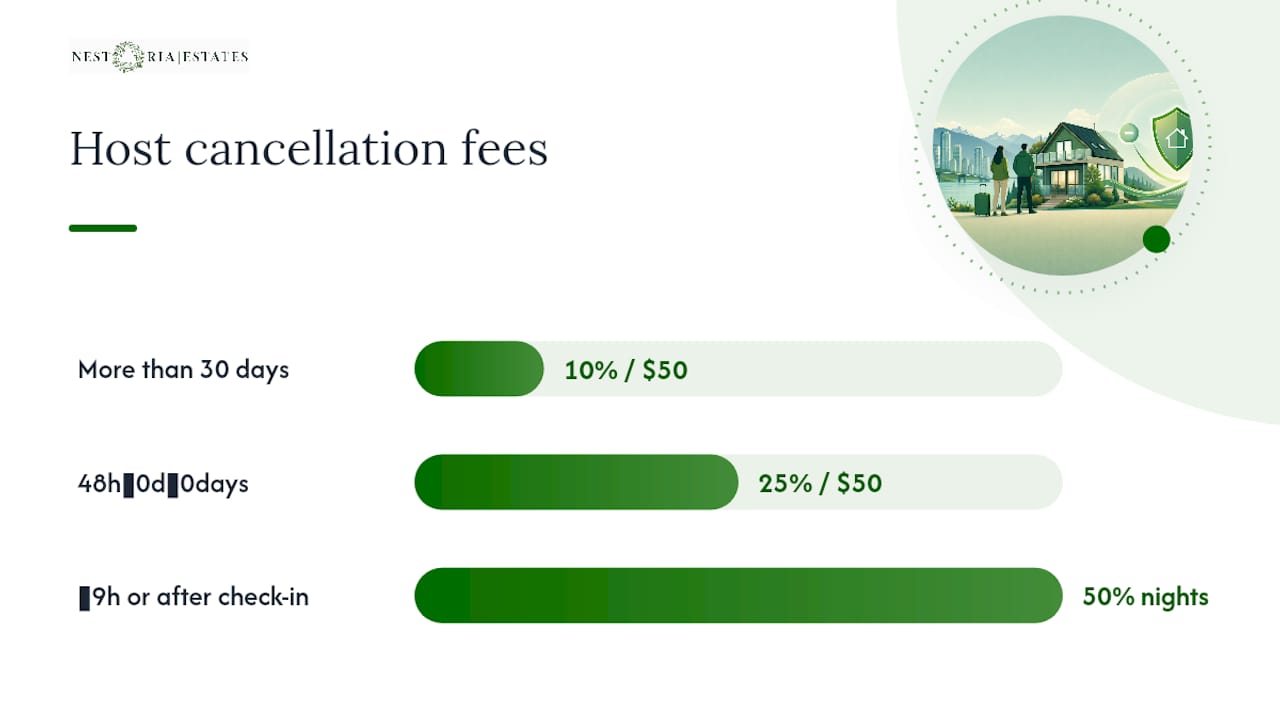
Airbnb’s fee structure runs on three timing windows, and the percentage jumps hard the closer you get to check-in.
More than 30 days before check-in: 10% of the reservation amount.
48 hours to 30 days before check-in: 25% of the reservation amount.
48 hours or less before check-in, or after the guest has already checked in: 50% of the nights not stayed.
Every tier carries a $50 USD minimum fee, so even a tiny booking still costs you something. The Host Cancellation Policy for homes counts the base nightly rate, cleaning fee, and any pet fees toward the “reservation amount,” but it excludes taxes and guest service fees from the calculation.
Statistic snapshot: Canceling more than 30 days out costs roughly 10% of the reservation amount. Canceling inside the 48 hour window costs around 50% of the nights not stayed, significantly increasing the fee.
Long stays get their own math. For reservations of 28 nights or more, Airbnb calculates the fee against a prorated monthly amount rather than the full booking, which usually softens the blow compared to a standard short-term cancellation.
When Can Fees Be Waived for Airbnb Host Cancellations?
Two doors lead to a waiver, and neither one opens automatically.
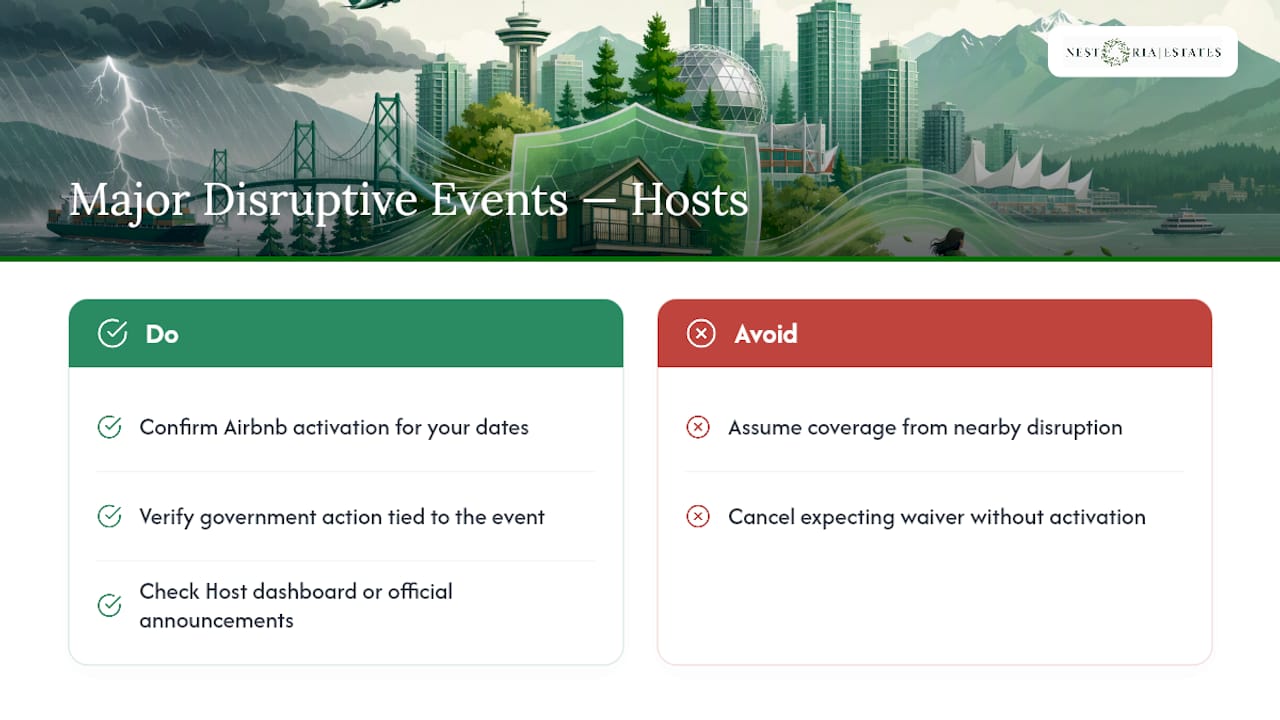
Major Disruptive Events. Airbnb activates this policy for a specific location and timeframe when something like a natural disaster, a declared state of emergency, or a government-ordered evacuation makes normal hosting impossible. Under the Major Disruptive Events Policy, you can cancel without paying the standard fee, but ordinary seasonal weather (a snowstorm, a heat wave) doesn’t qualify unless a government body takes formal action tied to it.
Valid host reasons. Airbnb reviews individual cases involving major property damage, conditions that make the unit genuinely uninhabitable (a burst pipe, no heat in winter), serious illness or injury, or a guest violating house rules badly enough that hosting them becomes unsafe.
Both paths require documentation: photos, repair invoices, or medical notes, and Airbnb reviews every request individually rather than granting blanket approvals. Even when a waiver is approved, it typically only removes the fee. It rarely restores the payout you would have earned for those canceled nights.
The Real Cost: Calendar Blocks, Reputation, and Superhost Status
The dollar fee is often the smallest part of what a cancellation costs you.
Calendar blocking. Canceled dates get locked, so you can’t immediately relist and rebook that stretch of nights, which means lost revenue that never shows up on any fee invoice.
The automated public note. Airbnb posts a visible flag on your listing after a cancellation, and that note tends to lower click-through and booking conversion for weeks afterward, according to BIV’s coverage of Airbnb’s cancellation policy.
Superhost eligibility. Airbnb factors cancellation rate directly into Superhost status, and a single cancellation can knock a borderline host out of the tier for an entire quarter.
Repeated cancellations. Multiple cancellations in a short window can trigger account suspension or permanent removal from the platform.
Pro Tip: Treat the public note like a bad review that never expires from search results. If you’re staring down a cancellation, call Airbnb support before you click cancel. Sometimes they’ll cancel on your behalf without the same visible penalty hitting your listing page.
How Do You Cancel an Airbnb Reservation Without Losing Everything?
Order of operations matters more than most hosts realize.
Talk to the guest first. Tell them what’s happening before you touch the cancellation button, and offer alternatives if any exist (a different unit, a partial refund, rebooking).
Gather your evidence immediately. Time-stamped photos, dated repair receipts, vendor contact information, or a doctor’s note if illness is the cause.
Contact Airbnb support directly if you’re within 24 hours of check-in. The standard online cancellation flow is often restricted that close to arrival, so a phone or chat request with support is usually your only path.
Ask Airbnb to cancel on your behalf when possible. A support-initiated cancellation, backed by your documentation, carries a better shot at a fee waiver than a host-initiated one.
Pro Tip: Export everything before you call. Screenshots of a burst pipe, a plumber’s invoice with the date visible, and your message thread with the guest all strengthen your case far more than a verbal explanation.
Where Do You Find Your Cancellation Policy, and How Is It Different From the Penalty Rules?
Your listing’s cancellation policy (Flexible, Moderate, Strict, or Super Strict) shows up on the listing page itself, under the pricing breakdown guests see before booking. That’s a completely different mechanism from the Host Cancellation Policy discussed above.
Guest-facing policies govern what a guest gets refunded if they cancel, including a standard 24 hour free cancellation window on most short stays, per Airbnb’s guide to choosing cancellation policies.
The Host Cancellation Policy governs what happens when you, the host, cancel, and it applies the same way regardless of which guest-facing policy you’ve set.
Confusing the two is a common mistake. Setting a Strict policy doesn’t protect you from host-side penalties. Those are Airbnb’s rules, not yours to set.
Better Options Than Canceling Outright
Before you cancel, run through a short list of fixes that cost less than the fee.
Bring in a co-host or local manager to cover check-in and guest messages if you’re the one who’s suddenly unavailable.
Negotiate directly with the guest. A modest partial refund or a rebooking credit is often cheaper than the cancellation fee, and guests frequently accept it if you offer it quickly and clearly.
Patch the property temporarily. A broken dishwasher doesn’t need to end a booking. A small discount plus a same-day repair appointment usually keeps the reservation intact.
Document platform outages separately. If a third-party lock, thermostat, or booking integration fails, save the outage logs and support tickets. That evidence matters if you eventually do need to escalate to Airbnb.
A booking workflow built to prevent double bookings removes a big chunk of the cancellations hosts bring on themselves in the first place.
Nestoria Estates’ Evidence Checklist for Cancellation Waivers
Getting a waiver approved comes down to what you can prove, not what you say happened. Keep a folder (cloud storage works fine) with time-stamped photos of any damage, dated repair receipts, vendor contact details, and, for health-related cancellations, an appropriate medical note.
When you message the guest, state the fact plainly (“a pipe burst in the unit on [date]”), the fix you’re offering, and any attachment that backs it up. When you contact Airbnb support, lead with the same fact and attach everything at once instead of trickling in documents over multiple messages.
Verified cleaner on call, plus a backup contact if the primary is unreachable.
A signed maintenance contract with response-time guarantees.
A shared calendar with a co-host who can act if you can’t.
Pro Tip: Build this folder before you ever need it. Hosts who scramble to find a repair invoice after the fact usually lose the waiver on documentation grounds alone, per Airbnb’s evidence guidance for services cancellations. For Vancouver owners specifically, the vacation rental hosting tips cover local maintenance vendors worth having on speed dial.
Flexible, Moderate, Strict, and Super Strict: Which Cancellation Policy Should You Set?
These four tiers control what your guests get back if they cancel, and choosing the wrong one either scares off bookings or leaves you exposed to last-minute empty calendars.
Flexible refunds guests in full if they cancel at least 24 hours before check-in, which tends to boost booking volume because it removes hesitation, but it also means you can lose a booking with almost no notice.
Moderate requires guests to cancel five or more days out for a full refund, giving you a slightly larger buffer to rebook.
Super Strict is the tightest tier, usually reserved for hosts with a long track record, and it limits refunds heavily even for early cancellations.
You set or change this policy from your listing’s editing dashboard, under the pricing and availability section. Changing it only affects future bookings, never reservations already confirmed under the old terms. Hosts chasing occupancy in a competitive market like Vancouver often lean Moderate: tight enough to discourage casual cancellations, loose enough not to scare off bookings compared to Strict or Super Strict. None of these guest-facing settings change your obligations under the Host Cancellation Policy if you’re the one canceling.
How Should You Tell a Guest You’re Canceling Their Stay?
The message itself often determines whether a guest leaves a scathing review or simply rebooks elsewhere without complaint.
State the reason plainly and early, before the guest finds out some other way. Vague explanations breed suspicion, and guests who feel stonewalled are far more likely to leave a one-star review out of frustration rather than fact.
Offer something concrete in the same message: help finding another listing, a full refund processed immediately, or a credit toward a future stay. Guests remember whether you tried to make it right, not just that something went wrong.
Keep the tone matter-of-fact rather than apologetic to the point of over-explaining. A short, clear message (“Unfortunately I need to cancel due to a plumbing emergency, here’s what I’m doing to help you rebook”) reads as competent. A long, defensive message reads as guilty.
Follow up once the guest has rebooked or been refunded, just to confirm everything resolved cleanly. That closing message is often what keeps a guest from leaving a negative review even though the stay itself never happened, since it shows they were taken care of through to the end.
What Does a Cancellation Actually Cost You Beyond the Fee?
The fee is a one-time hit. The calendar disruption is ongoing.
A canceled reservation doesn’t just erase that booking’s income. It also removes your listing from active search rankings for those dates while the block is in place, meaning you lose visibility to guests browsing for overlapping date ranges even if they’d have picked different nights.
Rebooking speed matters more than most hosts assume. A property that sits empty for even a week during peak season in a market like Vancouver can lose more in raw revenue than the cancellation fee itself, especially if the canceled dates fell during a high-demand weekend or event period.
Repeated cancellations compound the damage because Airbnb’s search algorithm weighs cancellation rate as a ranking signal. A host with a clean record generally shows up higher in search results than one with recent cancellations, even if every other metric (reviews, response rate, pricing) is identical.
This is where the gap between the fee and the real cost becomes obvious: a $120 fee on a $1,200 booking looks minor next to weeks of reduced search visibility and a blocked calendar during your highest earning season.
What Legal Rules Apply to Airbnb Cancellations Where You Host?
Airbnb’s Host Cancellation Policy is a platform rule, not a law, and it sits alongside whatever short-term rental regulations apply in your city or province. Some municipalities require hosts to honor confirmed bookings except under specific, narrow circumstances (health and safety emergencies, for instance), and violating a local ordinance can carry consequences separate from anything Airbnb charges.
Consumer protection rules in some jurisdictions also give guests recourse beyond Airbnb’s own refund process, particularly for services or experiences booked through the Host Cancellation Policy for Services and Experiences. If you’re operating in a market with strict short-term rental licensing (Vancouver included), check your municipal permit conditions before assuming Airbnb’s rules are the only ones that apply. A cancellation that’s fine under Airbnb’s policy can still put you offside with a local bylaw if the underlying reason (an unpermitted unit, a safety violation) is something regulators care about independently.
None of this replaces legal advice specific to your city. Airbnb’s policy tells you what the platform will charge. It says nothing about what your local government requires.
How Do Extenuating Circumstances Interact With Host Cancellations?
Airbnb narrowed its old “Extenuating Circumstances” policy into the more specific Major Disruptive Events framework, and that shift matters more than most hosts realize. The Major Disruptive Events Policy now expects hosts to absorb ordinary, foreseeable local risk (a rainy season, a predictable seasonal storm) unless a government body takes formal action tied to the event.
That’s a meaningfully tighter standard than the old wording implied. A snowstorm alone doesn’t qualify. A government-declared state of emergency because of that snowstorm does. Airbnb’s 2024 update to the policy clarified exactly this activation mechanic: the event has to be tied to a specific location and timeframe that Airbnb formally activates, and your reservation dates need to fall inside that window.
Practically, this means you can’t assume coverage just because something disruptive happened nearby. Check Airbnb’s official announcements or your Host dashboard for an active Major Disruptive Events notice covering your specific dates and region before you count on a waiver. If nothing has been activated, your cancellation falls back to the standard fee schedule regardless of how legitimate the disruption feels to you personally.
Can You Dispute an Airbnb Cancellation Penalty?
Yes, and the process starts with contacting Airbnb support directly rather than assuming the fee is final. Explain the circumstances, attach your documentation (repair invoices, photos, medical notes, whatever applies), and request a case-by-case review.
Airbnb doesn’t publish a formal appeals timeline, but support agents can reverse a fee or lift a Superhost impact if the evidence clearly supports a valid host reason or a Major Disruptive Event that wasn’t automatically detected. The key is specificity: vague requests get vague responses, while a request built around dated, named evidence tends to move faster.
If support denies the initial request, ask to escalate to a specialist team, since front-line agents don’t always have full visibility into Major Disruptive Events activations for a given region. Keep every piece of correspondence in writing inside the Airbnb messaging system rather than over the phone alone, so there’s a record if you need to reference the case again later.
Persistence matters here more than most hosts expect. A denied waiver isn’t always a final answer, particularly when new documentation surfaces after the initial cancellation.
Author Perspective: Lessons From Vancouver Property Management
Hosts routinely overvalue the short-term revenue they’d lose by not canceling and undervalue the reputational drag that follows. One Vancouver case that stands out: a host facing a maintenance emergency avoided canceling entirely because a co-host covered check-in while repairs happened same-day. Keep an evidence folder and a written process checklist ready before you ever need them. The hosts who scramble in the moment are the ones who eat both the fee and the search penalty.
— Kamran
Reduce Cancellation Risk With Nestoria Estates
Most cancellations trace back to the same root causes: no backup for check-in, a maintenance issue nobody caught early, or a guest message that went unanswered too long, so applying vacation rental revenue tips that actually work can help reduce these issues. Such issues can be managed through co-hosting coverage, maintenance coordination, proactive guest messaging, and pricing optimization, helping prevent emergencies that force cancellations.

For Vancouver Airbnb owners managing a property solo, that operational backup is often the real gap, not a lack of good intentions. Nestoria Estates’ full-service management covers guest communication, cleaning coordination, and revenue reporting so a single missed message or delayed repair never turns into a canceled booking and a hit to your Superhost status. This management arrangement is intended for owners seeking to earn income while minimizing operational risks. Request a free revenue and risk assessment through the Services page to see where your current setup is exposed.
Sources
FAQ
Do Airbnb Hosts Get Penalized for Canceling?
Yes. Airbnb charges a fee of 10%, 25%, or 50% of the reservation depending on timing, with a $50 minimum, and also blocks your calendar and adds a public note to your listing.
Do Airbnb Hosts Have the Right to Cancel a Reservation?
Hosts can cancel at any time, but doing so without a qualifying Major Disruptive Event or documented valid reason almost always triggers the standard cancellation fee and operational consequences.
What Happens if I Cancel an Airbnb Booking as a Host?
You’ll typically pay the applicable percentage fee, lose access to that calendar block for immediate rebooking, and get a public note on your listing, unless Airbnb approves a waiver based on documented evidence or an activated Major Disruptive Events Policy.
Recommended
Comments