

File Within 14 Days to Win Airbnb Damage Claims in Vancouver
When damage happens at an Airbnb, the guest is typically responsible for the cost, but the host has to prove it. Claims start in Airbnb’s Resolution Center, hosts generally have 14 days after checkout (or before the next guest arrives) to file, and guests get 24 hours to respond to a reimbursement request. If a guest doesn’t pay, Host damage protection may cover the host. Photograph everything immediately and keep every conversation inside the app.
TL;DR:
Hosts must file damage claims within 14 days of checkout or before the next guest arrives, with all evidence—including photos and receipts—properly organized.
Taking timestamped photos immediately after discovering damage, kept inside the Airbnb platform, is crucial for a strong claim and can prevent disputes later.
AirCover damage protection covers physical property damage, extra cleaning, and some lost income but is limited and not a substitute for comprehensive insurance.
Disputed claims are reviewed by Airbnb’s Community Support using the full documentation, so organized, clear submissions facilitate faster resolutions.
Professional management helps ensure timely, thorough documentation and faster claim processing, reducing the risk of rejection and lengthy disputes.
Table of Contents
What to Do the Moment You Find Airbnb Property Damage
The first hour after discovering damage matters more than anything you do afterward. Evidence collected quickly and inside the platform holds up. Evidence collected late, or over text message, usually doesn’t.
If you’re the host:
Take timestamped photos and videos of the damage from multiple angles before touching or cleaning anything.
Pull together receipts or invoices for repairs, replacements, or professional cleaning.
Message the guest through the Airbnb app describing what you found and asking for their response.
Open a Resolution Center request if the guest doesn’t reply or disputes responsibility.
If you’re the guest:
Notify the host through the app the moment you notice pre-existing damage on arrival, not when you check out.
Photograph anything questionable in the unit within the first hour of your stay.
Save every message and receipt tied to the reservation.
Respond to any reimbursement request within 24 hours, even if you disagree with it.
Pro Tip: A single in-platform message reporting damage the moment you walk in is often the strongest piece of evidence a guest can have. It puts a timestamp on the record before any dispute even starts.
Off-platform texts, phone calls, and verbal promises carry almost no weight once Airbnb gets involved. If it isn’t in the Resolution Center or the app’s messaging thread, treat it as if it doesn’t exist.
How Do You File an Airbnb Damage Claim?
Filing a reimbursement request is a structured process, and skipping a field or missing a deadline is the fastest way to get denied.
Go to the Resolution Center from your Airbnb account and select “Request money” for the reservation in question.
Choose the damage or extra cleaning category and enter the amount you’re requesting.
Itemize each cost separately (for example: “broken lamp, $85; carpet cleaning, $120”) rather than submitting one lump figure.
Attach supporting documents and submit the request to the guest.
What to attach:
Before-and-after photos showing the condition change clearly.
Dated receipts or invoices for repairs, replacements, or cleaning.
An independent repair estimate for anything beyond a simple fix.
A short written timeline of when the damage was discovered and reported.
Hosts must generally file within 14 days of checkout or before a new guest checks in, whichever comes first. Guests then have 24 hours to accept, decline, or respond to the request. Miss either window and the claim gets harder to win. Hosts who file late may lose the right to reimbursement altogether, and guests who ignore a request risk having it escalated and decided without their input.
What Host Damage Protection (AirCover) Actually Covers
Host damage protection is the part of AirCover for Hosts that reimburses property damage guests cause and don’t pay for themselves. It’s a backstop, not blanket insurance, and it comes with real boundaries.
Covers physical damage to the property and its contents caused by a guest during a stay.
Can reimburse extra cleaning costs beyond normal turnover.
May cover lost income in specific documented cases, such as when a unit can’t be re-booked due to damage.
Includes reservation screening and guest identity verification, features currently available in Canada that reduce risk before a booking is even confirmed.
Coverage limits are shown in USD, and any reimbursement Canadian hosts receive gets converted at the exchange rate on the payout date, not the booking date. That’s worth remembering if you’re budgeting reimbursements in Canadian dollars.
AirCover is a guarantee with terms, conditions, and exclusions, not an insurance policy. If a claim exceeds AirCover’s scope, or involves liability beyond property damage, that’s where a personal or commercial short term rental insurance policy needs to pick up the slack.
How Airbnb Reviews a Disputed Damage Claim
Once a claim gets escalated, it moves from the two parties negotiating into Airbnb’s Community Support team reviewing the evidence directly. They look at the full Resolution Center thread, all attached photos and receipts, and the timeline of when each message was sent.
If Community Support determines the guest is responsible, Airbnb may charge the guest’s payment method directly.
The guest then has 60 days from the charge date to appeal if they believe the decision was wrong.
Reviewers respond better to organized submissions: label your receipts, order your photos chronologically, and attach a short note explaining what happened rather than a wall of unsorted files.
A messy submission doesn’t just look unprofessional, it makes the reviewer’s job harder, and that tends to work against whoever submitted it. Hosts and guests who present a clean, dated, itemized packet consistently get faster, clearer outcomes than those who send scattered evidence over multiple messages.
Why Airbnb Rejects Damage Claims (and How to Avoid It)
Most rejected claims fail for the same handful of avoidable reasons.
The host filed after the 14-day window closed, or after the next guest had already checked in.
No before-and-after photos exist, only after photos with nothing to compare them to.
Missing receipts, invoices, or a repair estimate to back up the dollar amount requested.
The claim tries to charge for normal wear and tear, like a worn mattress or faded upholstery, rather than actual guest-caused damage.
Preventing rejection starts before any guest ever checks in. Keep a photographed inventory of the property at every turnover, save every supplier invoice as it comes in, and get an independent repair estimate whenever a claim involves more than a minor fix. Noting “normal wear and tear excluded” in your own turnover checklist also helps you and Airbnb draw a clean line between chargeable damage and expected deterioration.
Pro Tip: If a claim gets rejected and the damage cost is significant, weigh a small-claims court filing against the time and fees involved. For a $150 lamp, it’s rarely worth it. For a $4,000 flooring repair, it might be.
How a Vancouver Property Manager Documents Damage Claims
Professional management changes what a damage claim looks like before it’s ever filed. A structured inspection routine and consistent evidence handling turn a messy dispute into a clean, well-supported request.
A photographed turnover inventory at every checkout, so “before” and “after” comparisons already exist the moment damage is found.
Evidence stored in dated folders per reservation, with receipts and repair estimates attached as they come in rather than hunted down later.
Guest communication kept strictly inside the Airbnb app, with a single itemized claim packet assembled before a Resolution Center request ever goes out.
Owners working with a manager should expect a report after any incident: what was found, what it cost, what was submitted to Airbnb, and the outcome. That paper trail is what separates a claim that gets approved on the first pass from one that drags through appeals.
Why Professionally Managed Listings Win More Claims
Most damage disputes aren’t lost on the merits. They’re lost on documentation. A host with a scattered photo on their phone and no receipt loses to a guest who simply says “that’s not what I broke,” even when the host is right.
Managed turnovers close that gap. Consistent inspections and platform-first communication mean there’s rarely a gray area about what condition the unit was in and when. Managers who already have supplier relationships can turn around a repair estimate in a day, not a week, which matters when a 14-day filing clock is running. None of this makes damage disappear. It just means the claims that do happen get resolved faster, with less back-and-forth, and with a lot less stress landing on the property owner. That’s the entire value of treating documentation like a system instead of an afterthought, and it’s a big part of what reduces disputes at Airbnb turnover cleaning in the first place.
— Kamran
How Nestoria Estates Handles Damage Prevention for Vancouver Owners
If you’re a Vancouver owner who’s read this far and thought, “I don’t have time to photograph every turnover and chase receipts,” that’s exactly the gap Nestoria Estates fills. We treat documentation as a built-in part of managing your property, not an extra task bolted on after something breaks.

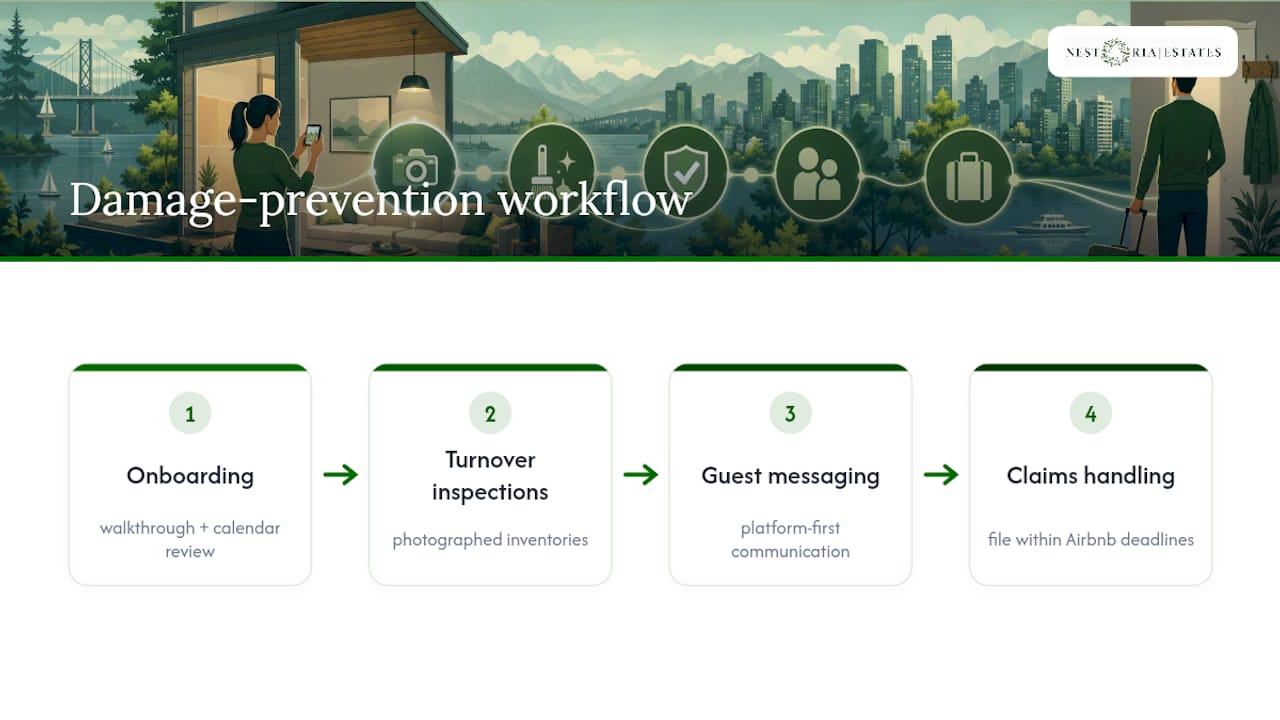
Management services often include routine turnover inspections, photographed inventories, platform-first guest messaging, and claims handling when damage occurs. That means when a guest causes damage, the evidence already exists, the Resolution Center request gets filed inside Airbnb’s deadlines, and you’re not the one piecing together receipts at midnight. For owners dealing with recurring disputes, it’s also worth understanding when Airbnb insurance in Canada needs to supplement AirCover’s limits.
Onboarding typically includes a walkthrough of the property and a review of the current booking calendar, so the first turnover under management can follow a documented process. If you want a hands-off setup with the paperwork already handled, visit our services page to get a consultation and see what a managed listing looks like for your property.
Where to Read Airbnb’s Official Damage Claim Policies
For the exact policy language behind everything above, go to the source documents directly. The Host damage protection page confirms filing deadlines and eligible costs. The AirCover for Hosts overview lists what’s covered, what’s excluded, and current USD limits. The Host Damage Protection Terms spell out the legal distinction between a guarantee and an insurance policy. You can also browse more host-side breakdowns in our Airbnb hosting challenges archive.
FAQ
Does Airbnb Reimburse Hosts for Damage?
Yes, through Host damage protection under AirCover for Hosts, provided the host files within the required window and submits photos, receipts, and a clear itemization of costs.
Can Airbnb Make a Guest Pay for Damage?
Yes. If Community Support determines a guest caused the damage after reviewing the submitted evidence, Airbnb can charge the guest’s payment method directly.
Can I Refuse to Pay an Airbnb Damage Charge?
You can dispute a reimbursement request within the 24-hour response window, and if you’re already charged, you have 60 days to file an appeal with supporting evidence.
How Do I File a Damage Claim on Airbnb?
Open the Resolution Center, select “Request money” for the reservation, itemize each cost, attach before-and-after photos and receipts, and submit within 14 days of checkout or before the next guest arrives.
What Happens if a Host Misses the 14-Day Filing Deadline?
The claim becomes far harder to win, since Airbnb’s review process is built around that window, and filing late is one of the most common reasons reimbursement requests get rejected.
Recommended
Comments