

ID Verification for Canadian Hosts: 15–30 Minute Checklist
Yes, you can require ID verification for hosts to check before a guest arrives, and yes, you should. Platforms like Airbnb let you enable a reservation requirement for verified guests, and you can also request specific documents after booking for legal or compliance reasons. Doing so cuts fraud risk, backs up your compliance paperwork, and speeds up incident response if something goes wrong. The fastest move today is to turn on the verified-guest setting in your listing preferences and add one plain sentence about ID requirements to your listing description.
TL;DR:
Enabling a reservation requirement for verified ID helps reduce fraud risks and facilitates compliance with local regulations like B.C.'s registration or Ontario’s record-keeping rules.
Hosts should set a clear, consistent policy asking for government-issued ID, communicate it in listing language, and store copies securely in a way that meets provincial retention obligations.
Platform verification badges confirm a guest’s identity match through facial recognition but do not provide hosts with ID images or verify criminal history or past damages.
Requesting additional IDs or occupant confirmations should be done only with specific legal reasons, keeping requests identical for all guests to avoid discrimination claims.
Using a standard, repeatable process, and considering professional property management, can significantly mitigate verification and compliance challenges, especially when managing multiple listings.
Table of Contents
Quick Checklist: What to Do in the Next 15 to 30 Minutes
Most hosts overthink identity verification. It’s a settings toggle, a sentence of listing copy, and a message template. Here’s the order that actually works:
Turn on the reservation requirement. In your hosting settings, enable the option requiring verified ID before a guest can book.
Add listing language. One sentence explaining that ID confirmation is required for all stays, and why (guest safety, insurance compliance, local registration rules).
Pick your accepted ID types and decide where you’ll store copies (a locked cloud folder, not your phone’s camera roll).
Draft a standard post-booking message asking for the specific document and setting a clear deadline, ideally 48 hours before check-in.
Write down your escalation path for guests who refuse or fail verification, including when you’ll cancel under your policy.
None of this requires new software. It requires deciding, once, exactly what you’ll ask for and sticking to it every time. Inconsistent enforcement is what gets hosts accused of discrimination, not the requirement itself.
How Does Platform ID Verification Actually Work?
Airbnb’s identity verification process collects personal information and may ask for a government ID photo plus a matching selfie before issuing an identity verified badge. Vrbo runs a comparable check at booking or payment. Neither platform hands your guest’s actual ID image to you. You see a badge, not the document.
That distinction trips up a lot of hosts who assume “verified” means they’ve personally reviewed a passport scan. They haven’t. What the badge confirms:
The guest’s name and photo match a government-issued document on file with the platform.
A selfie was cross-checked against that document using facial matching technology.
The account has passed the platform’s own fraud and duplicate-account screening.
What it does not confirm: criminal history, prior eviction or damage claims, or whether the guest has been banned from other rental platforms. Platform verification badges tend to correlate with higher booking acceptance, but that badge is not a substitute for your own screening or for local registration compliance. Airbnb sometimes requires ID submission before a listing can even publish, particularly in jurisdictions with legal reporting obligations.
How to Require or Request ID Safely
Your first stop is the reservation requirements panel in your hosting settings. This is where you toggle on “verified ID required” for anyone who books, and it applies before a reservation is confirmed, not after.
Past that setting, here’s what you can still do without breaking platform rules:
Send a post-booking message requesting the guest’s full legal name and expected arrival time, matched against their reservation.
Ask for a second form of ID only when a specific legal reason applies (municipal registers, insurance claims).
Request the guest confirm the number of occupants matches the booking.
Phrase every request the same way for every guest, regardless of nationality, age, or appearance. Selective enforcement is where verification policies turn into discrimination complaints.
Pro Tip: Keep your ID request message identical across every booking. A copy-paste template protects you legally and saves you from writing it fresh at 11 p.m. when a guest is already at your door.
Legal and Compliance Rules That Affect ID Collection
British Columbia and Ontario have both tightened the paperwork trail around short-term rentals, and your ID collection habits need to line up with both.
In B.C., hosts must register with the provincial short-term rental registry as of May 1, 2025, and list the registration number on every platform listing. Platforms are required to validate that number before a listing goes live. To register, you’ll need one piece of photo ID plus two supporting documents proving principal residence, such as a driver’s licence, a BC Services Card, a property assessment notice, or a utility bill.
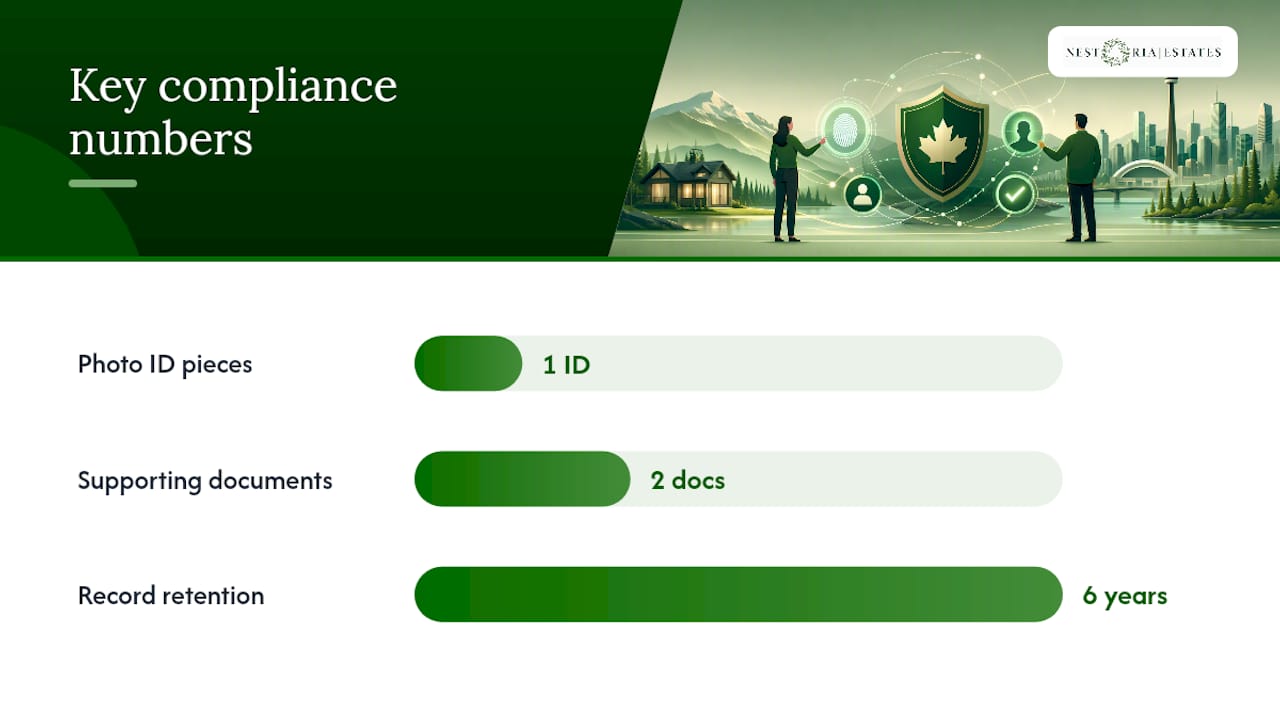
Ontario takes a different angle, focused on guest records rather than host registration. Providers and platforms operating there must record each guest’s name and primary residence, and retain those guest registers for six years.
Practical takeaways for any Canadian host:
Registration numbers and ID verification are separate systems; keep both current.
Municipal bylaws in many cities require posted host contact information, which ties directly to your own identity disclosure obligations.
A six-year retention window means “delete after checkout” is the wrong default if you operate in Ontario or a similarly regulated municipality.
What IDs Should You Accept?
Stick to government-issued documents you can verify at a glance: a driver’s licence, a passport, or a provincial ID card. Guests can redact document numbers or non-relevant fields, but the name, photo, and expiry date should stay visible.
Beyond the document itself, a few verification layers add real fraud resistance:
Selfie plus liveness check: confirms the person holding the ID is physically present, not reusing a stolen photo.
NFC or chip reads: some verification providers scan the embedded chip on newer passports and ID cards, which is harder to forge than a photo.
Provider-delegated checks: services that specialize in document authentication and cross-reference against known-fraud databases, used as a method, not an endorsement of any single vendor.
For most Vancouver hosts running a handful of units, platform verification plus a selfie match covers the bulk of risk. High-value or long-stay bookings are where the extra layer earns its cost.
Red Flags and How to Handle Them
Watch for guests who avoid platform messaging in favor of texting immediately, who book same-day with no prior reviews, or who ask to change the guest count after arrival. Blurry ID photos, mismatched names between the booking and the document, or a sudden refusal to complete verification are all signals worth pausing on.
Require a refundable security hold for unverified or first-time guests.
Consider in-person ID confirmation at check-in for higher-value properties.
Document every refusal or mismatch in writing, and escalate to the platform’s trust and safety team rather than confronting the guest yourself.
Templates and Rollout Checklist You Can Copy
Add this line to your listing description: “All guests must complete identity verification before check-in, per our house policy and local regulations.”
Send this after booking: “Thanks for booking! To confirm your reservation, please upload a government-issued photo ID through the platform’s verification tool within 48 hours. This protects both of us and satisfies local registration rules.”
Store all ID-related messages and confirmations in one secure, access-limited folder.
Set a retention schedule matching your province’s rule (six years in Ontario, per current guest-register requirements).
Log every incident, refusal, or mismatch in a shared owner report.
Layer platform verification with a post-booking request only when a specific legal or safety reason applies, never as a blanket duplicate check.
How Nestoria Estates Handles Verification in Practice
Managing this solo across multiple listings gets tedious fast, which is one reason property managers exist. A manager typically layers platform verification with registry filings and a standard guest-screening workflow, so nothing depends on one host remembering a step at midnight.
Verification status gets checked against the reservation before check-in instructions go out.
Owner reports document each verification outcome alongside occupancy and revenue data.
Flagged bookings trigger a review step before the manager approves check-in, with incidents logged for the property owner.
Professional setup around verification and registration tends to reduce the number of surprises owners deal with directly.
What Actually Matters Here
Most advice on this topic obsesses over which ID-scanning app looks the most sophisticated. That’s the wrong priority. The evidence points somewhere more boring: consistency beats technology. A host who applies the same simple ID request to every single guest, every single time, avoids more legal and reputational trouble than a host who bought an expensive verification tool but only uses it selectively.
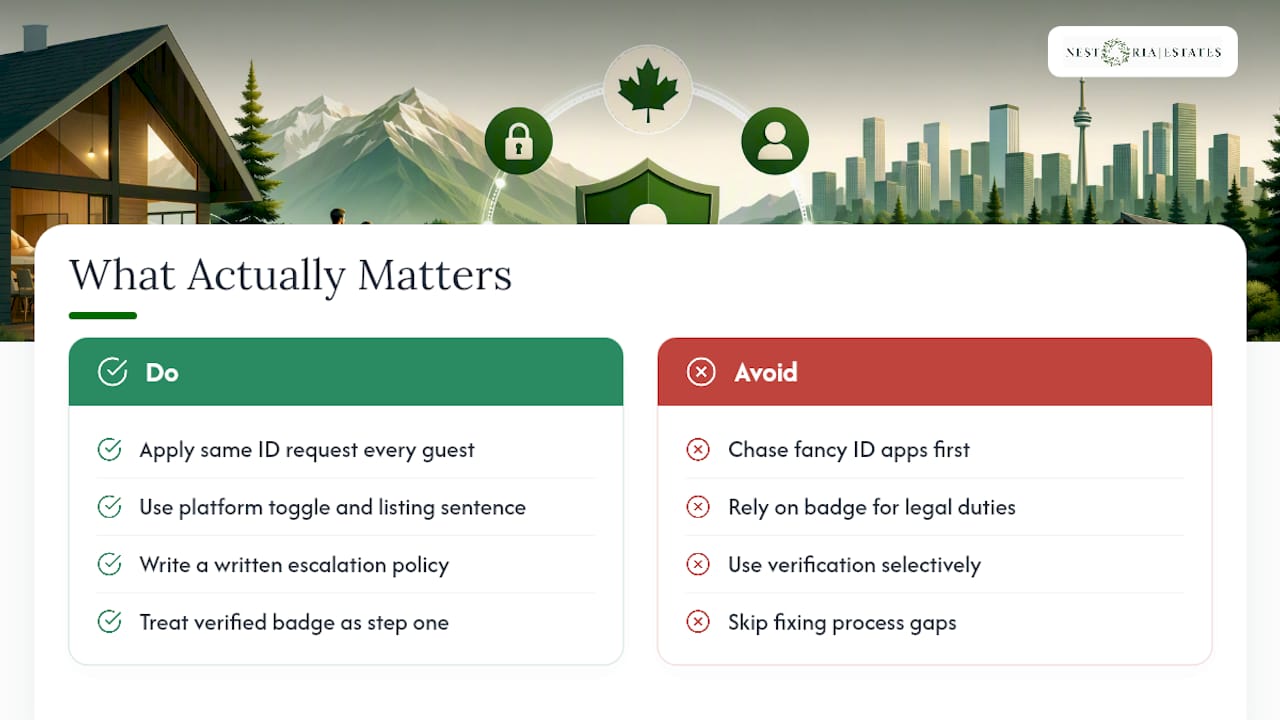
The conventional wisdom also overstates what platform badges prove. An identity verified badge tells you the person is who they say they are. It tells you nothing about whether they’ll be a good guest, and it definitely doesn’t cover your registration obligations in B.C. or your guest-register duties in Ontario. Treat the badge as step one, not the whole system.
If you’re prioritizing, start with the free stuff: the platform toggle, the listing sentence, and a written escalation policy. Buy fancier verification layers only after you’ve nailed the basics. Most hosts skip straight to shopping for tools and never fix the process gaps underneath.
— Kamran
Let Nestoria Estates Handle Verification and Compliance for You
Nestoria Estates is the alternative to juggling registration filings, guest screening, and ID requests yourself, especially if you own one or more Vancouver Airbnb units and would rather not track six years of guest records manually.

A professional property manager can handle the full verification workflow, including platform settings, registration number tracking, guest screening consistency, and owner reporting that documents every step for compliance purposes. Instead of writing your own message templates and remembering provincial retention rules, you get a system already built around them. That matters most for owners running multiple listings, where one missed verification step can turn into a registration dispute or a guest incident with no paper trail.
Check out Nestoria Estates’ services and request a free revenue projection to see what hands-off management, verification included, looks like for your property.
Sources
FAQ
Is It Okay for Airbnb Hosts to Ask for ID?
Yes. Hosts can enable a verified-guest requirement in their reservation settings, and can request specific ID details after booking when a legal or safety reason applies, as long as the request is consistent across all guests.
What Are Red Flags for Airbnb Hosts?
Common warning signs include guests avoiding platform messaging, same-day bookings with no review history, mismatched names between the ID and the reservation, and sudden refusal to complete verification.
Is It Safe to Verify Your Identity on Airbnb?
Airbnb’s verification process collects personal information and a government ID photo but does not share that document image with hosts; hosts only see a verified badge, not the underlying file.
Why Do Airbnb Hosts Require ID?
Hosts require ID mainly to reduce fraud, confirm the person checking in matches the booking, and support compliance with local rules like B.C.'s short-term rental registry or Ontario’s guest-register retention requirements.
Does Platform Verification Replace Provincial Registration?
No. A verified badge confirms identity, not registration compliance; B.C. hosts still need a separate provincial registration number validated on their listing.
Recommended
Comments